In the Typesetting TeXniques video series, we share our expertise as professional copyeditors and typesetters of mathematics. We frequently hear from authors that our work makes their papers better. This is how we do it.
TeX will allow you to place math of any height or depth within a paragraph. That doesn’t mean you should. When you include inline math that extends far above or below the baseline, here’s what happens:
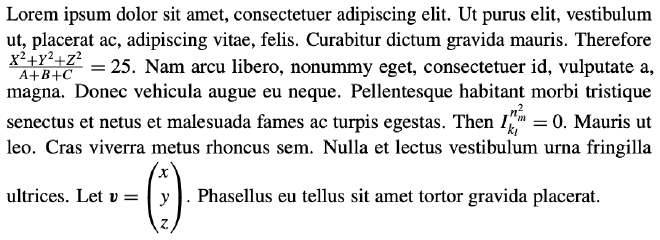
The distances between lines 2 and 3, lines 4 and 5, and lines 6 and 7 are greater than the uniform distance kept between the other pairs of lines. This irregular spacing has an unprofessional appearance. This may be fine for informal documents, unpublished lecture notes and the like, but a published manuscript, which may be referenced for years, decades or longer, deserves a better presentation.
Sometimes, displaying the math is the best fix:
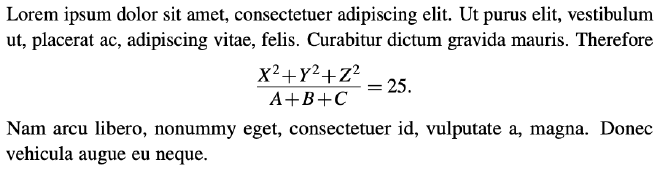
Other times, finding a way to keep the math inline is best, if possible. Here are a few things to try.
Use existing equivalent notation #
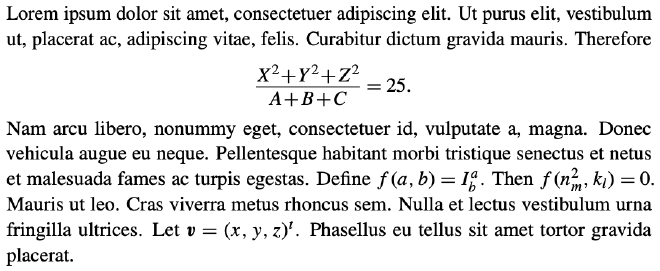
You might consider writing \( \exp(a^{p^2} + b^{q^3}) \) for an exponential, or saying \( \boldsymbol{v} = (x, y, z)^t \) to indicate a column vector:

Introduce new notation #
To avoid expressions inline that are too tall or too deep, you may want to introduce custom notation:

This is a particularly good route when you’ll be using expressions of the same form repeatedly.
Tame subscripts and superscripts #
You have probably noticed that TeX modifies the placement of superscripts and subscripts in expressions that contain both. When this contributes to irregular spacing between lines, we can try replacing the superscript with
\smash[b]{superscript}
(or the subscript with \smash[t]{subscript}). This tells TeX to typeset the expression as if the superscript’s depth were zero (or the subscript’s height were zero). If this reduces the overall size of the expression enough to avoid irregular spacing between lines without causing the superscript and subscript to collide, then we have a solution:

The code used here is
I^{\smash[b]{n^2_m}}_{k_l}=0
This approach may be best suited for expressions that you’ll be using infrequently.
Improved presentation #
Here is the original paragraph, now with uniform interline spacing:
A tool for professionals #
 We can use
 \smash more dangerously than discussed earlier, by telling TeX to ignore the height and depth of an entire expression.
This should never be done before the final stages of copyediting and typesetting a paper, because it can easily result in an overlap in printed material.
An MSP production editor demonstrates such a use of \smash in the video below.
Watch the video #
Further reading #
The TeXbook by D. E. Knuth: See page 78 in Chapter 12 for a technical description of how TeX attempts to keep the lines of a paragraph a fixed width apart.
The LaTeX Companion, 2nd ed. by F. Mittelbach and M. Goossens with J. Braams, D. Carlisle, and C. Rowley: See Section 8.7.5 for a discussion of \smash and friends.
Header image by Nikki Rowaan, available from Unsplash. Free to use under the Unsplash license.